This page gives a hands-on to understand Executor, Job, Stage & Task using the Spark Web App
Let us start an Application. For this demo, Scala shell acts as a Driver (Application)
mountain@mountain:~/sbook$ spark-shell
Connect to web app(localhost:4040) and explore all the tabs. Except for Environment & Executors tab all other tabs are empty

Let us do some action and see what happens,
scala> val data = sc.parallelize(1 to 10)
data: org.apache.spark.rdd.RDD[Int] = ParallelCollectionRDD[0] at parallelize at <console>:21
scala> data.count
res0: Long = 10
Let us check all the tabs,
Jobs Tab

We are able to see how our action(count) run is bifurcated into sub components (Job -> Stages -> Tasks). So any action is converted into Job which in turn is again divided into Stages, with each stage having its own set of Tasks.
Given below is the snapshot of other Tabs which are self explanatory
Stages Tab

Executors Tab

Let us once again run the action 'count' and see what happens. This time we got a new Job(Job Id 1) with its own Stages & Tasks
scala> data.count
res1: Long = 10
Jobs Tab

 Note : Clicking on Description of each Stage will provide us information on Tasks related to that Stage
Executors Tab

Let us explore the concept of Persistence using Web App. Let us Persist to our RDD 'data' and run action 'count' again. This time we are interested in Storage Tab(It has been empty so far)

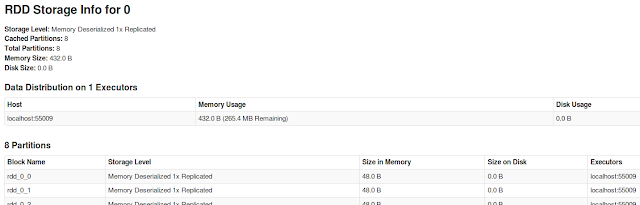
The Executor tab also provides us information on the Memory that is used to persist data(Earlier memory usage is 0.0 B)

That completes our discussion
Let us start an Application. For this demo, Scala shell acts as a Driver (Application)
mountain@mountain:~/sbook$ spark-shell
Connect to web app(localhost:4040) and explore all the tabs. Except for Environment & Executors tab all other tabs are empty

That clearly indicates we have an Executor running in the background to support our Application.
Let us do some action and see what happens,
The First Run
scala> val data = sc.parallelize(1 to 10)
data: org.apache.spark.rdd.RDD[Int] = ParallelCollectionRDD[0] at parallelize at <console>:21
scala> data.count
res0: Long = 10
Let us check all the tabs,
Jobs Tab

We are able to see how our action(count) run is bifurcated into sub components (Job -> Stages -> Tasks). So any action is converted into Job which in turn is again divided into Stages, with each stage having its own set of Tasks.
Given below is the snapshot of other Tabs which are self explanatory
Stages Tab

Executors Tab

The Second run
Let us once again run the action 'count' and see what happens. This time we got a new Job(Job Id 1) with its own Stages & Tasks
scala> data.count
res1: Long = 10

Note : Clicking on Description of each Job will take us to Stages specific to that Job
Stages Tab

Executors Tab

Adding Persistence
Let us explore the concept of Persistence using Web App. Let us Persist to our RDD 'data' and run action 'count' again. This time we are interested in Storage Tab(It has been empty so far)
scala> import org.apache.spark.storage.StorageLevel
import org.apache.spark.storage.StorageLevel
scala> data.persist(StorageLevel.MEMORY_ONLY)
res3: data.type = ParallelCollectionRDD[0] at parallelize at <console>:21
scala> data.count
res4: Long = 10

The tab provides us information on RDDs that are persisted. The link in RDD Name provides us more information on the RDD

The Executor tab also provides us information on the Memory that is used to persist data(Earlier memory usage is 0.0 B)

That completes our discussion
